Holiday-Ready Day: Your first request is free.

“You really know how to make a grown women cry. The site looks just beautiful. Something I have wanted to tackle for a long time. Your skill level and professionalism is something to marvel at.”Anne Willis, de la terre Skincare
For PetScreening: what a first week with Start Right Team Max could look like, in your brand and built from your live site. Concept, not live. Nothing on your site was touched.

Team Max concept for PetScreening
One complex build a week, starting with a Pet Policy Journey Studio.
Start with a free request
A note from Will
Hi PetScreening team,
I’m Will Mosley. I run Start Right, based in Hendersonville. I build websites and the harder pieces behind them for North Carolina businesses.
This is what a first week with us could look like for PetScreening: your homepage, rebuilt around your three resident paths, and the Week 1 build, a Pet Policy Journey Studio where a housing operator picks a market and a platform, then sees the pet owner, assistance animal and no pet journeys side by side before implementation.
Every photo, icon and quoted line comes from petscreening.com. New headlines are marked as suggested, the sample operator (Northline Communities) is fictional, and the studio makes no eligibility, fee or legal decision: assistance animal review stays with your in-house team. Nothing on your site was touched.
Will Mosley, Start Right · Wed Nov 11, 2026
Today
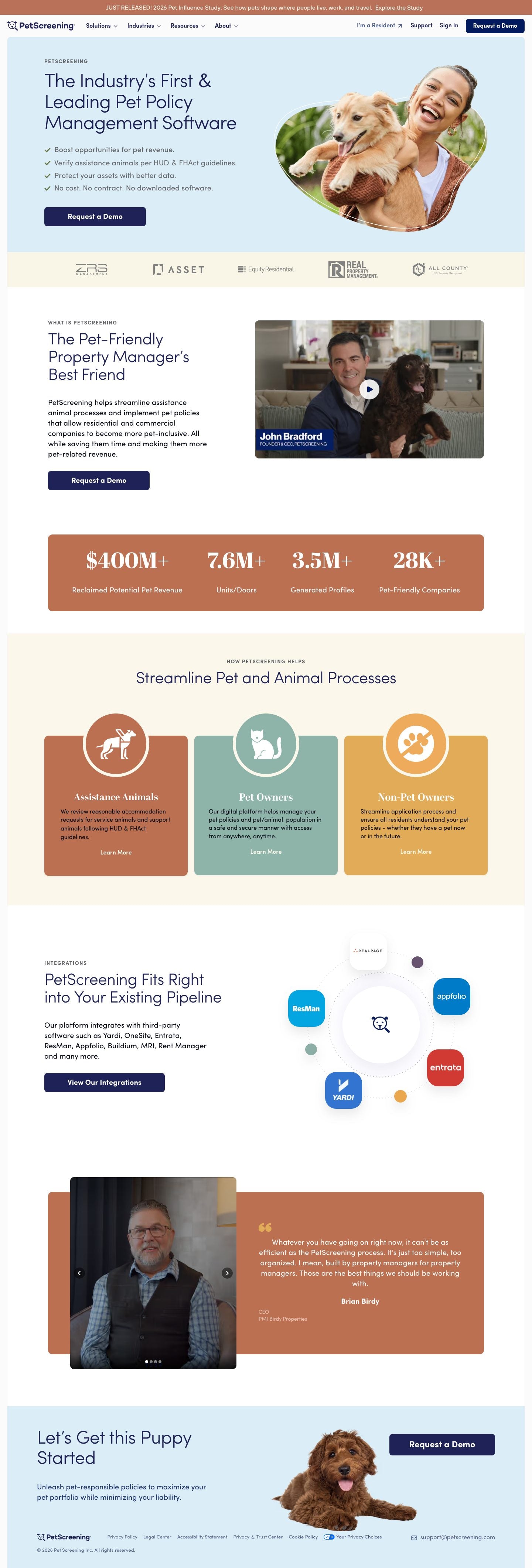
Your homepage today
petscreening.com on a computer and on a phone, the whole page. Scroll inside each frame. The cookie bar is hidden for the capture.

New homepage · concept by Start Right, not live
Your homepage, built around three resident paths
Your hero and your three paths first, then the new Journey Studio, the industries you serve, how assistance animal review works, integrations, a customer’s words and your close.
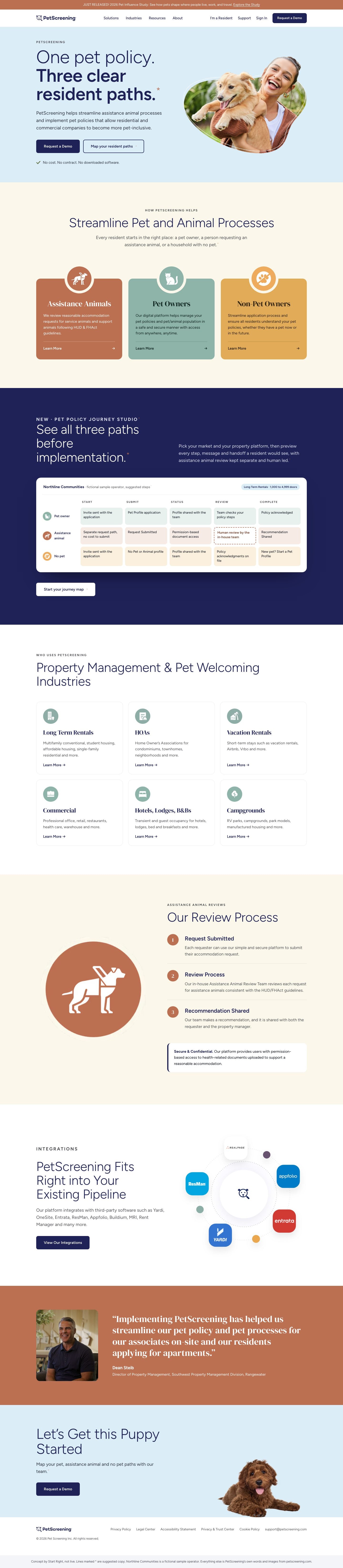

- Three paths, named in the first screen. A suggested headline, “One pet policy. Three clear resident paths.”, over your own hero photo and sky blue, with your sentence about streamlining assistance animal processes and your “No cost. No contract. No downloaded software.” line. Request a Demo stays the first button.
- Your three cards, kept word for word. Assistance Animals, Pet Owners and Non-Pet Owners in your rust, sage and yellow, with your icons and your card lines, given equal size and equal weight.
- The Week 1 build gets a home. A navy band previews the Pet Policy Journey Studio: a sample operator’s three paths side by side, with assistance animal review marked human led. It links straight into the studio.
- Who uses PetScreening, then how review works. Your six industry cards and their lines, then your three review steps (Request Submitted, Review Process, Recommendation Shared) and your Secure & Confidential line.
- Integrations, one customer, then the puppy. Your integrations copy and graphic, Dean Steib’s quote from your site, and your “Let’s Get this Puppy Started” close with your footer.
Built onYour Webflow site. The sections map to the section, card and CMS patterns your pages already use, in your colors. Your Sofia Pro and Abril Display are paid fonts, so the mockup uses free stand-ins (Figtree, DM Serif Display); the build would use yours.
Marked in the mockupLines with * are suggested copy. The journey preview and its sample operator, Northline Communities, are fictional. Everything else is your own wording and images.
Week 1: Pet Policy Journey Studio · concept, not live
Map the pet, assistance animal and no pet journeys before implementation.
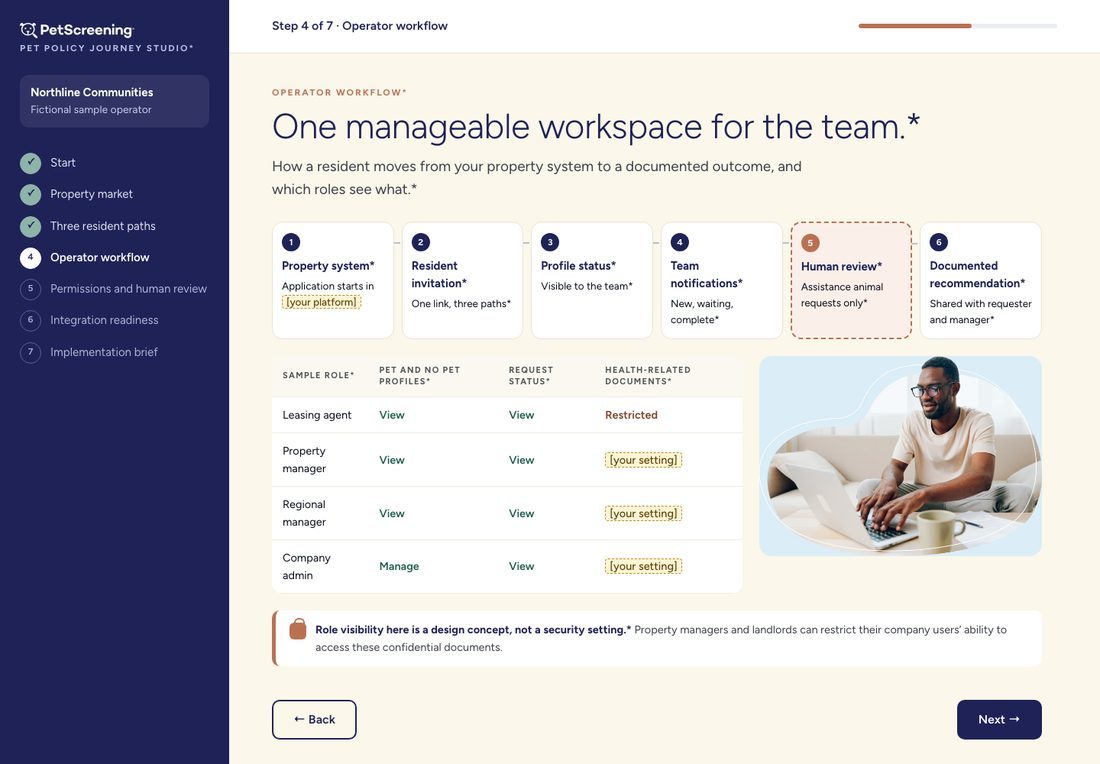
A housing operator picks a market and a platform, previews the pet owner, assistance animal and no pet paths side by side, maps the team workflow, permissions and integration handoffs, and ends with an implementation brief for PetScreening review and a demo request. Shown on a phone with a fictional operator; nothing submits anywhere, and nothing decides eligibility, fees or legal questions.
Swipe sideways to see each screen.

1 Start2 Property market3 Three resident paths4 Operator workflow

5 Permissions and human review6 Integration readiness7 Implementation brief
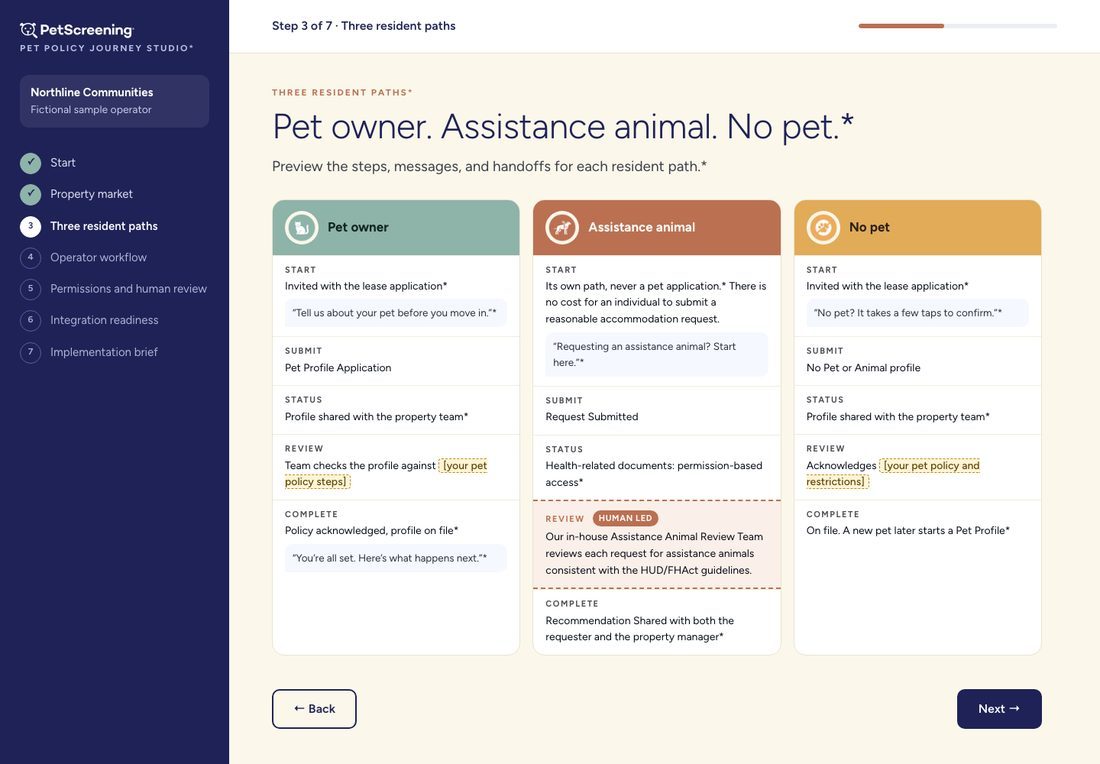
The same studio on a computer
A step list on the left in your navy; the work on the right. Every assistance animal review step carries a dashed “human led” mark.


Week 1, Monday to Monday
How the week would run
What would happen if PetScreening took the seat. None of this has started.
Monday
Scope
- We agree on one fictional housing market and one current property platform to map first.
- We agree on the seven screens and the brief they produce.
- We confirm who at PetScreening reviews product wording and accommodation safeguards.
Tuesday to Thursday
Build in review
- Market choice, the three resident paths, operator workflow, permissions checklist, integration checklist and the brief, built in a review copy, not on your live site.
- You click through it on your phone and mark changes.
Friday
Your review
- PetScreening checks product language, accommodation safeguards, permissions and integration boundaries.
- Nothing goes live without your OK.
Next Monday
Live
- The approved studio goes on petscreening.com, responsive, with synthetic sample data.
- We run it end to end and link it from the homepage and the demo path.
What live would mean
- The studio is public on your domain and works on a phone.
- All three resident paths are equally visible.
- Every assistance animal step shows human review.
- No eligibility, legal or fee logic anywhere.
- It ends on PetScreening review and a demo request.
What we would need from you
- [your pet policy steps] and the wording for each path
- [your status names] and notification rules
- [your role and permission settings] to describe
- Which integrations directory fields may be named
- Where the demo request should go
- Editor access to the Webflow site (never a password by email)
Worth a look
Worth a look, whatever you decide
On your live site today, each checked by hand on Wed Nov 11, 2026. Nothing has been changed.
- In the menu that opens on a phone, “I’m a Resident” links to petscreening.webflow.io/residents, the Webflow copy of the site, not www.petscreening.com/residents (which also answers).
- On the homepage, the Vacation Rentals card links to /industries/vacation-rentals-old, which redirects (301) to /industries/vacation-rentals. Pointing it at the final page saves a hop.
- The homepage has no meta description and no og:description, so search results and link previews choose their own text.
- The homepage industry cards and the Industries menu differ: the menu lists Mid-Term Rentals, Manufactured Housing and Student Housing; the homepage lists Commercial, Hotels, Lodges, B&Bs and Campgrounds.
Start Right Team Max
Start Right Team Max: one complex build a week, scoped Monday and live by the next Monday, plus one request at a time alongside it. Founding seat $10,000 a month, then $15,000. One seat.
- Week 1 would be the Pet Policy Journey Studio on this page. After that, one complex build a week, for example the homepage above, an industry page set, or a resident help path.
- Alongside it, one request at a time: copy edits, images, a new page.
- Everything is built in review first. Nothing goes live without your OK.